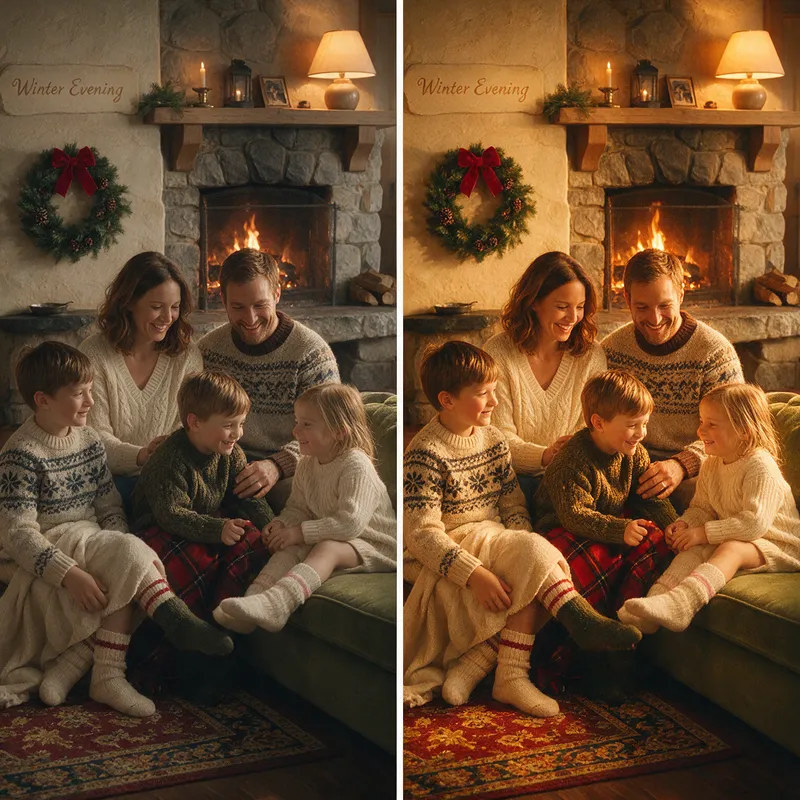
Warm Tone Enhancement
Add rich, warm golden tones to give your photos a cozy, nostalgic feel.
- Estimated cost
- 5 credits
- Resolution
- 1k
This template applies a rich, warm golden filter to your photos, creating a cozy and nostalgic atmosphere that feels reminiscent of late afternoon sunlight. The AI processes your image to infuse warm amber tones throughout, ensuring every element is bathed in a soft, inviting glow. You will notice a natural, healthy skin glow on any subjects present, along with subtle peach accents that add vitality without looking artificial. The lighting mimics the feel of golden hour, giving your picture a dreamy quality that is both modern and timeless.
To get started, simply upload one photo of your choice. There are no specific requirements regarding the subject matter; you can use portraits, landscapes, or indoor shots. The system preserves your original composition, meaning the placement of objects and people remains exactly as you took them. The AI focuses entirely on the color grading and tonal balance, transforming the mood while keeping the structural integrity of your image intact.
The final output is a square image with a 1:1 aspect ratio and a resolution of 1K. This format is ideal for social media profiles or web galleries where a compact, high-quality visual is preferred. The colors remain vibrant yet balanced, with deep shadows that carry a warm undertone rather than appearing harsh or dull. This results in a harmonious image that feels comfortable to look at.
This type of enhancement is perfect for personal memories, social media posts, or creative projects that require a unified, warm aesthetic. It is a great way to add emotion to everyday photos. A practical tip is to choose a photo with good lighting originally, as the warm tones will interact more pleasingly with naturally illuminated subjects, enhancing the overall depth and richness of the final result. The entire process is handled by AI to ensure a consistent and polished finish.